

Wedding website guide
How to create a wedding website
Everything you need to know, from choosing your design to publishing and managing your guests.
When should you start?
Earlier than you think. Most couples start as soon as they have a date and a venue, so there is somewhere to point guests when the news breaks. You do not need every detail finalised first. Your website stays private while you are building it, and your guests only see it once you publish.
For Australian couples, save the dates typically go out six to twelve months before the wedding. Having your website ready before that means you have a link to share, even if the finer details are still taking shape.
What to include
Most wedding websites cover the same practical ground, because most guests need the same things.
The essentials
- Event details. Your ceremony and reception venue, including the address and start time. Dress code and any special instructions for getting there.
- RSVP. An online form so guests can confirm whether they are coming, managed through your guest list.
- Travel and accommodation. Nearby hotel suggestions, parking and transport notes. Especially useful for regional venues or when many guests are travelling.
When you are ready to add more
Your story, a photo gallery, an order of the day, a registry and a livestream link for guests who cannot be there in person. None of these are required. Some couples keep their website spare and functional. Others use it to share the full story of how they met. Both approaches work well.
Choosing your design
Start with feeling, not category.
The most common mistake is choosing a wedding website design because it looks like a wedding website, rather than because it feels right. At Wedding Website Co, every design is individually art-directed with its own typography, palette, layout and atmosphere. Scroll inside any preview below to see it in action.
A formal city dinner calls for a different design than a relaxed garden afternoon. You can switch your design any time, before or after you publish. Your guests always see the most recently published version.
Soft Luxe
Contemporary luxury, cream/blush/champagne warmth
Setting up
Add your details, then publish when you are ready.
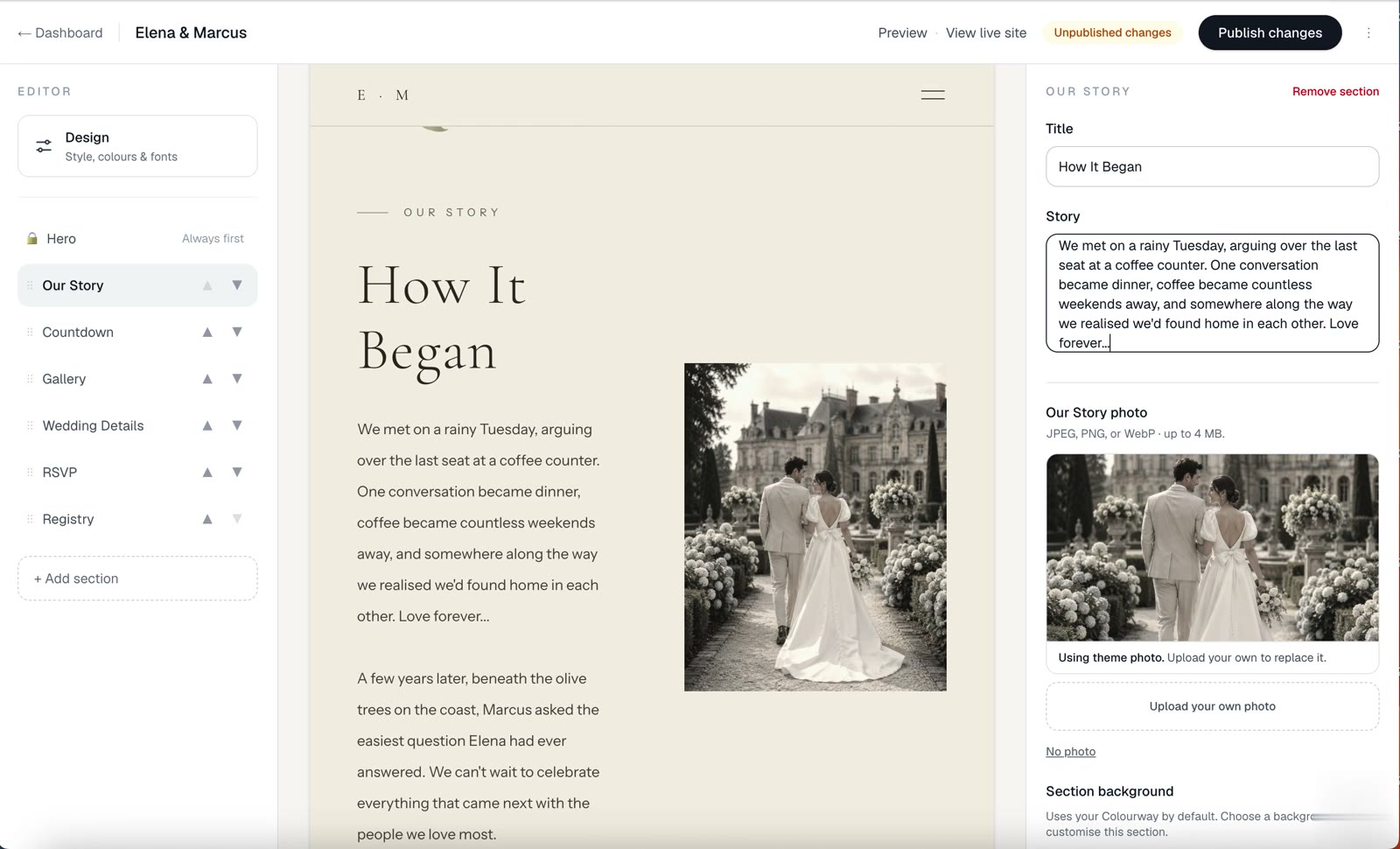
The editor shows you a live preview of your wedding website as you work. Change your story, swap a photo, adjust a detail and watch the preview update instantly.
Start with your names, your wedding date and your venue. Add a short story if you want to give your guests context, then fill in your event schedule and travel details. Before you publish, check that your event details are correct, your RSVP form is enabled and you have reviewed the mobile view.
Nothing reaches your guests until you publish. Once you do, you can keep editing. Any changes you save appear immediately.
Guests & RSVPs
Collecting RSVPs through your website.
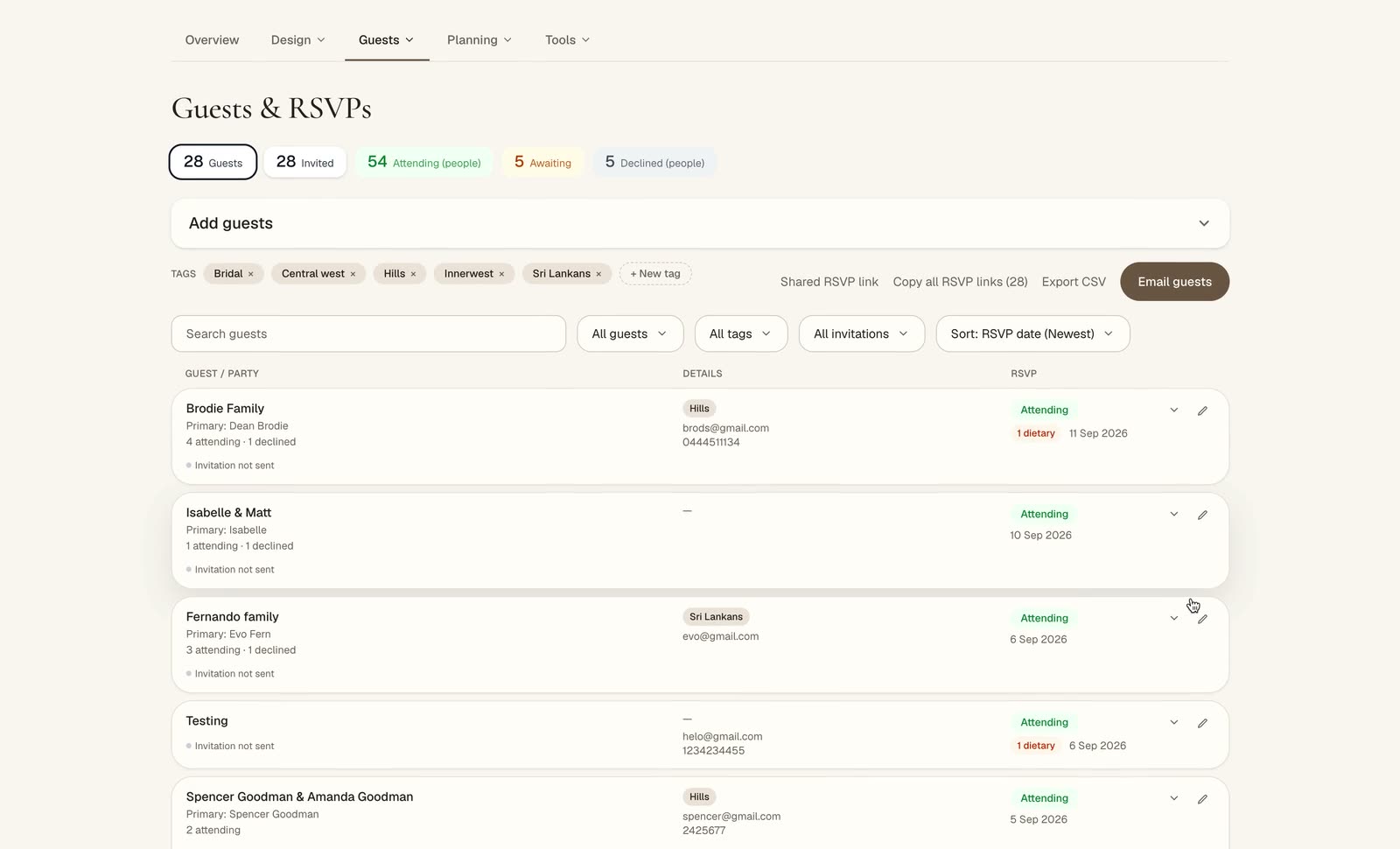
When you add guests to your list, they can RSVP directly through your wedding website. No app or account required. They find their name, confirm attendance and note any dietary requirements. You see every response in real time.
Add guests by household so couples and families respond together. Set an RSVP cut-off date and send reminders to guests who have not yet responded, without needing a separate tool.
Up to 75 guests on Free. Unlimited with Plus.
After you publish
Your wedding website does not stop at the day.
Once RSVPs start coming in, your guest list gives you a running count of confirmed attendees, outstanding responses and dietary requirements. Follow up with guests who have not yet responded from the same place.
When plans change, send a wedding update to the guests who need to know. Choose your audience, whether that is everyone on your list or just those who are attending.
After the wedding, your site stays live. 3 months on Free, 12 months on Plus and 24 months on Signature after your wedding date. A one year hosting extension is available at any time if you want it online longer.
Everything else
More that comes with your wedding website.
Save the Dates
Designed to match your wedding website. Add your photo, personalise the details and download or print.
Seating plannerPlus
Lay out your tables and drag each guest onto their seat. Capacity updates as you go.
Guest PhotosPlus
Guests share photos from the day through your website, with no account needed. Keep them private or publish a gallery.
Planning checklist
Every task from booking your venue through to sending thank you cards, with budget and vendor tracking.
Thank You cardsSignature
Designed in the same style as your website. Send directly to guests, or print and download.
Gift registrySignature
A registry published directly on your wedding website, with your own items and photos.
Pricing
How much does a wedding website cost?
You can start for free, with no credit card required. If you upgrade, it is a one time payment, not a subscription.
Free
Your wedding website, up to 75 guests, RSVP tracking, invitations and updates, a planning checklist, budget and vendor tracking, Save the Dates and a selection of designs. No credit card required.
Plus
Everything in Free, plus unlimited guests, the seating planner, guest photo sharing and the full design collection. One time payment.
Signature
Everything in Plus, plus the AI Design Studio, the AI Planning Assistant, a gift registry on your website and Thank You cards. One time payment.
Hosting is included after your wedding date: 3 months on Free, 12 months on Plus and 24 months on Signature. A one year extension is available at any time, not a subscription.
Ready to start?
Create your wedding website today. Start free, and add more when you know what you need.
Create your wedding website